NIGHTSTAND MODE / HOW TO
Set up Nightstand Mode
Turn your iPhone or iPad into a simple bedside view. Choose who appears, open Nightstand, and dim the display when you’re ready.
Before you start
Open the family view in Mirror Health on an iPhone or iPad with a connected glucose source.
You can show up to four people. The first four are selected by default; use the steps below to change them.
Let’s do it.
One picture. One step.
- 1
Open your people
Go to Settings → People. Select the person you want to show on your bedside display.
- 2
Choose who appears
Under Display Options, tap Add to Nightstand. If the row already says On Nightstand, that person is selected. Repeat for up to four people.
If four people are already selected, tap On Nightstand for someone to remove them before adding another.
- 3
Open Nightstand
Tap Nightstand in the app’s navigation. Place your iPhone or iPad where you can see it, in portrait or landscape. One person gets a focused view; more people share the display.
Keep the device connected to power for longer use. The screen stays awake while Nightstand is active.
- 4
Settle in and dim the screen
Tap the moon button to dim the display. Tap the sun to brighten it again. If the controls hide, tap the screen to bring them back.
Use Close Nightstand to return to the app. The Nightstand dimming resets when you leave.
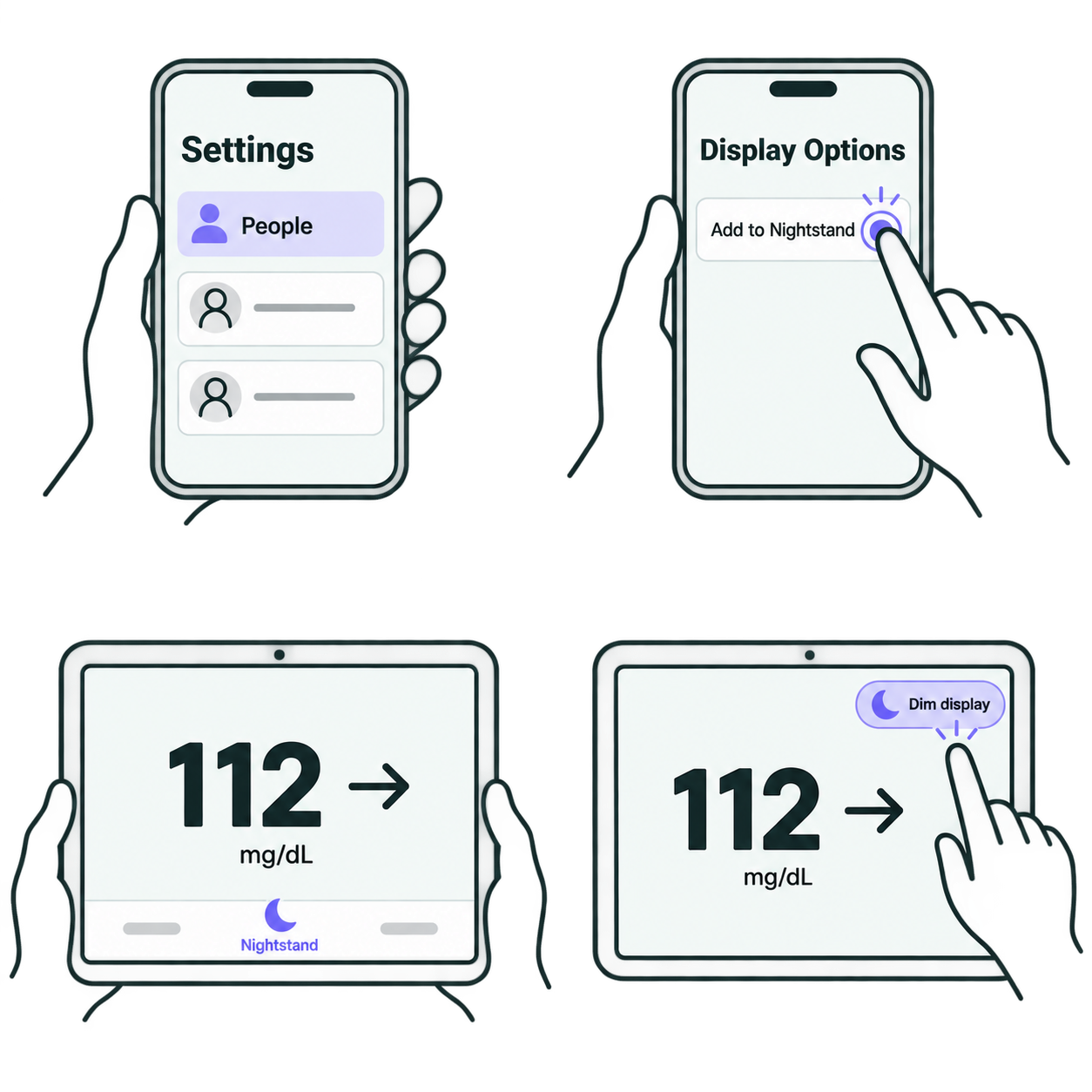
Illustrations show example people and readings. Your layout may vary slightly by device.
How do I go back to the original people?
In Settings → People, use Reset Nightstand to Default (first 4). This option appears after you customize the selection.
Where did the buttons go?
Nightstand hides its controls to keep the display clear. Tap the screen to bring them back, then use Dim display, Brighten display, Refresh glucose, or Close Nightstand.
Why is a reading old or missing?
Check the reading time, internet connection, and connected glucose source. Use Refresh glucose to request another update. A refresh cannot create a new reading if the source has not provided one.
Does Nightstand replace my CGM alarms?
No. Nightstand is a supplemental display. Keep your official CGM app, receiver, prescribed alerts, and care plan active.